🏃 Workouts
Same demo data — six Backer themes, swipe or wait 5s.
🏃 Workouts
343 active days · 40 day longest streak
🌲Classic Green
What you're building
A heatmap you can check in from inside a Notion page in real time — no leaving the page.
3 steps
- 1
Step 1 — Create a habit
Create a new habit and start logging.
- 2
Step 2 — Copy the embed link
Click Embed in the top-right corner of the heatmap. You will see two options:
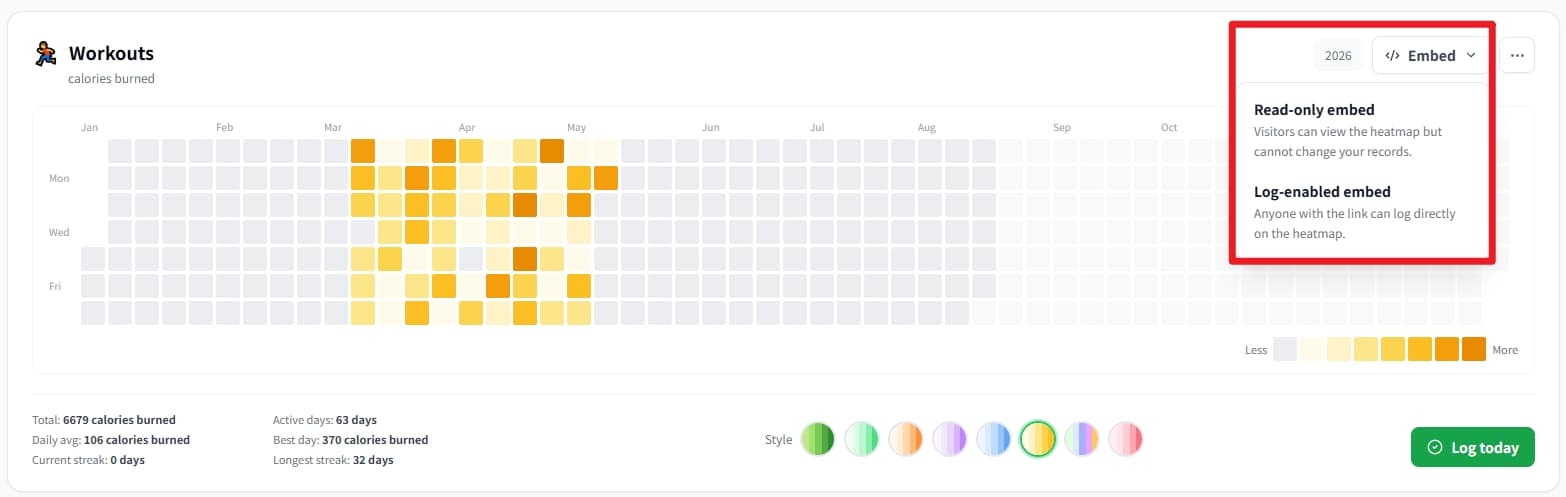
Choose Read-only embed or Log-enabled embed from the Embed menu - Read-only embed: You cannot log directly in Notion, and neither can anyone you share the page with. This protects your heatmap data.
- Log-enabled embed: Anyone who can access your Notion page can log directly, including you. Best for private Notion pages.
- 3
Step 3 — Paste into Notion
Open the Notion page where you want the heatmap
- •Type /embed and choose Embed;
- •Paste the Streakly link and wait 2–5 seconds to load
- •Done
Frequently asked
›Does this work on Notion Free?
Yes. Notion's standard Embed block is available on all plans, including Free and Plus.
›Can I embed multiple habits?
The free plan lets you create up to 2 heatmaps; Backers and Permanent Backers can create up to 30.
›The embed shows 'refused to connect' — fix?
Usually a typo in the URL or a corporate firewall blocking iframes. Re-copy from Streakly, ensure it starts with https://streakly.org/embed/, and try a personal Notion workspace first.
Also useful
Ready to start your streak?
Free forever for one tracker. Pay once for unlimited and lifetime updates.