Notion tutorial

Embed a habit heatmap in Notion in 3 steps

Exact clicks from a blank Notion page to a live GitHub-style heatmap you can log inside — no Zapier, no screenshot swaps, about 90 seconds.

See pricing →

No signup, no credit card. Just a 1-second link.

🏃 Workouts

Same demo data — six Pro themes, swipe or wait 5s.

🏃 Workouts

339 active days · 71 day longest streak

🟢GitHub Green

MonWedFri
JunJulAugSepOctNovDecJanFebMarAprMay
Less
More

What you're building

You'll create a Streakly heatmap widget, copy its public embed URL, and paste it into a Notion /embed block. The iframe stays live: you click a day inside Notion, enter a number, and the cell updates without leaving the page.

3 steps (with exact UI labels)

  1. 1

    Step 1 — Create the heatmap on Streakly

    Open streakly.org and start a free trial widget — no signup required for the first one.

    • Click Try it now — no signup on the homepage (or open your dashboard if you already have an account).
    • When asked what to track, pick Habit heatmap (not Travel atlas).
    • Name it something you'll recognise — e.g. Workout, Deep work, or Reading.
    • Optional: pick a color theme (green is default). Click Create.
    • You'll land on the widget editor. Click today's cell once to confirm logging works — you should see the square fill in.
  2. 2

    Step 2 — Copy the embed link

    Notion needs a URL, not a screenshot. Streakly gives you a stable iframe link per widget.

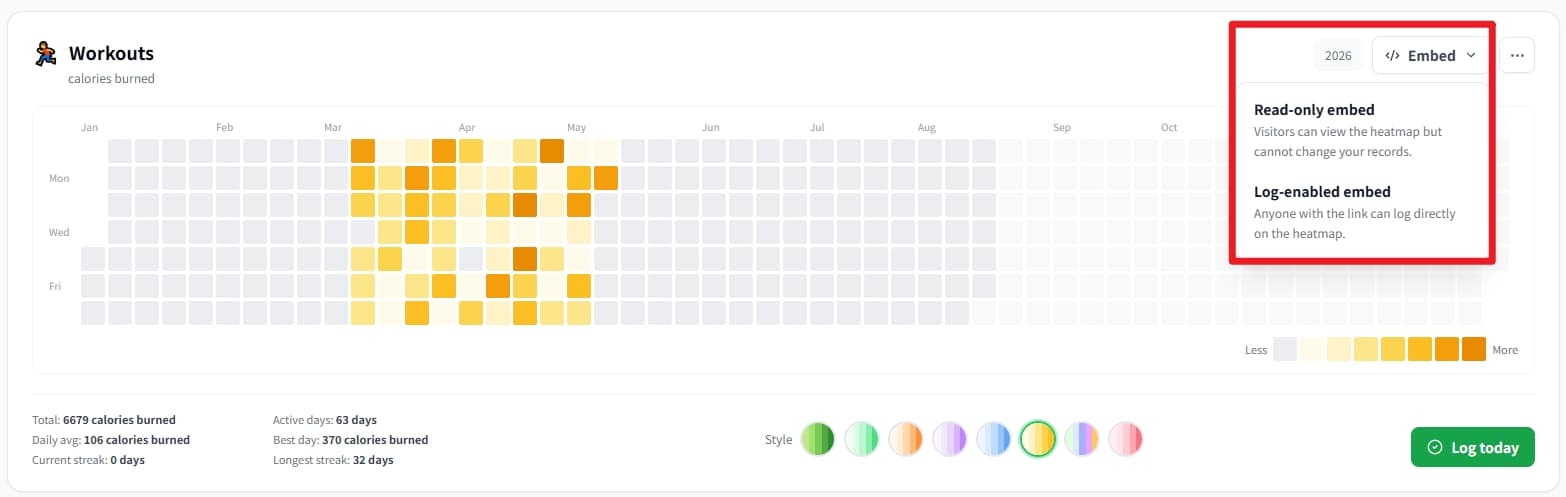
    • In the editor, scroll to Share & embed (or the embed panel on the right).
    • Make sure the widget is embeddable (Listed or Hidden both work — Hidden still loads in Notion if you have the link).
    • Click Copy next to the embed URL. It looks like https://streakly.org/embed/your-slug.
    • Keep this tab open — you'll paste the URL in Notion next.
  3. 3

    Step 3 — Paste into Notion

    Any Notion page that supports embed blocks works — personal dashboard, habit page, team wiki.

    • In Notion, open the page where you want the heatmap.
    • Type /embed and choose Embed (or Link to file → paste URL depending on your Notion version).
    • Paste the Streakly URL. Wait 2–5 seconds for the iframe to render.
    • Drag the block wider if the grid looks cramped — full-width works best on desktop.
    • Test: click a day inside the embed. If a number prompt appears, you're done.

Notion-specific tips

Full-width block

Notion columns under ~400px clip the year view. Use one column or drag the embed to page width.

View-only for teammates

Coworkers see the heatmap if they can open the Notion page. Only you can log — your private write token is never in the embed URL.

Mobile Notion

Logging works in the mobile app iframe, but editing is easier on desktop. The heatmap still renders for viewers on phone.

Frequently asked

Does this work on Notion Free?

Yes. Notion's standard Embed block is available on all plans, including Free and Plus.

Can I embed multiple habits?

Yes on Pro/Lifetime — create one widget per habit, each with its own embed URL. Free plan includes one heatmap widget.

The embed shows 'refused to connect' — fix?

Usually a typo in the URL or a corporate firewall blocking iframes. Re-copy from Streakly, ensure it starts with https://streakly.org/embed/, and try a personal Notion workspace first.

Also useful

Ready to start your streak?

Free forever for one tracker. Pay once for unlimited and lifetime updates.

See pricing →
Notion tutorial — Streakly